

 Save 10% off your first LabelValue order |
 Everything You Want to Know About the CMYK 4-Color Printing Process
- Jan 11, 2019
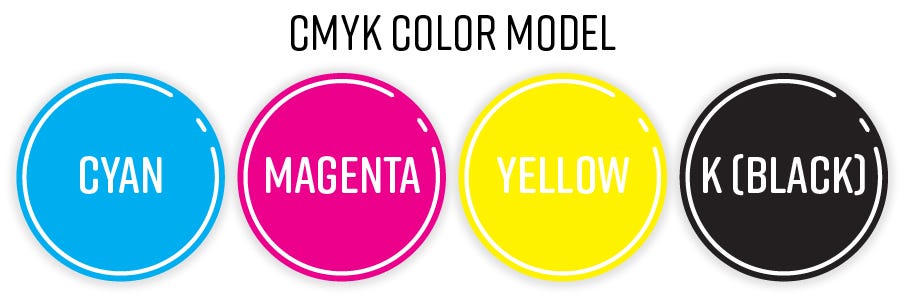
You’ve seen it everywhere and you’re probably wondering, “what is CMYK?” You want to ask someone about it, but aren’t sure if it's pronounced “kehmyuk,” and don’t want to seem inept in front of your print-industry buds. It’s okay, wring the sweat from your eyebrows. We’ve got you covered.. In the following article we break down the CMYK 4-color model and how it's used in label printing.
Now, the CMYK 4-color model is, without a doubt, one of the most used color processes in the print-industry. The letters actually stand for Cyan, Magenta, Yellow, and Key. Now, as you know cyan is a derivative shade of blue, magenta is essentially a light purplish red. Yellow is a blend of burgundy and gray. Just kidding. Yellow is yellow, but key is actually black. The black toner has this illustrious name because, in order for the process to work, the other pigments must be carefully aligned with it.
The CMYK 4-color model relies on a subtractive process. See, printers meticulously mix the pigments while paying close attention to the percentages needed to create a new pigment. The composite pigments that are not needed, or are needed in lesser quantities, are carefully subtracted, in full or in proportion. To provide an oversimplified example, imagine you need the pigment green. Well, the printer would primarily utilize cyan and yellow, while subtracting all, or a percentage of, the remaining pigments, magenta and key.
Now, the “how” is very interesting. Each group of colors absorbs or subtracts certain wavelengths so that only a particular pigment shows. Print operators use four unique images for each of the pigments, using different screens to control the level at which they are applied. These images are transferred to printing plates and when all the plates have been rolled onto and applied to the paper, the CMYK pigments combine to produce the desired pigments.
[caption id="attachment_10103" align="aligncenter" width="483"] Our digital HP Indigo Press ink tanks, that uses CMYKOG. This method allows our gamut of color to be much larger than most other presses.[/caption]
It’s a delicate science that the print-industry has perfected over the years. There are manual processes in flexographic printing that produce these screens and printing plates, as well as digital processes that digitally create the correct mixtures.
“Now wait a second,” the astute reader might say. “There aren’t four primary colors and they certainly aren’t Cyan, Magenta, Yellow or Key – the primary colors are red, yellow and blue!” Well you’re somewhat correct and I’m glad you pointed that out. The science of primary colors, though, isn’t quite so black and white. For the purposes of this article, consider the following:
Colors are perceived by radiating wavelengths of energy primarily in the spectrum of the color that we perceive. E.g. something that is yellow in color emits wavelengths in the yellow spectrum of color.
Pigments, on the other hand, absorb other wavelengths, except the one that is perceived. Magenta pigment absorbs wavelengths except for magenta, allowing the pink color to be radiated more strongly than the other colors.
So why were cyan and magenta chosen over more traditional ones like blue and red? Simple, the assortment of magenta, cyan, and yellow allow for greater variation in the potential pigments produced. Cyan is a composite of blue and green. Magenta is a composite of red and blue. Yellow, unbeknownst to most of us, is a composite of green and red. Essentially, the pigments that make up each composite, and the pigments they are needed to produce, become more readily accessible.
“Awesome! Now, I’m ready to print.” Not so fast. If you are in the design stage, it is important for to remember that your computer screen doesn’t use CMYK. The printer does. Computer screens use a different color model.
[caption id="attachment_10107" align="aligncenter" width="602"] Brightly colored waves at the LED smd screen - close up background[/caption]
RGB is a color model used primarily for displaying images on a screen. The screens of your computer and smartphone will most likely employ this process. RGB stands for Red, Green, and Blue. Unlike CMYK, though, these refer not to pigments but to lights.
The computer carefully proportions and mixes the colors for this process too. The difference is that RGB color works by adding to, or increasing, the intensity of certain colors in the assortment to produce new ones. The term additive also alludes to the fact that when all three of these colors are combined they form white. Screens rely on this method because they, themselves, are naturally very dark.
[caption id="attachment_10109" align="aligncenter" width="448"]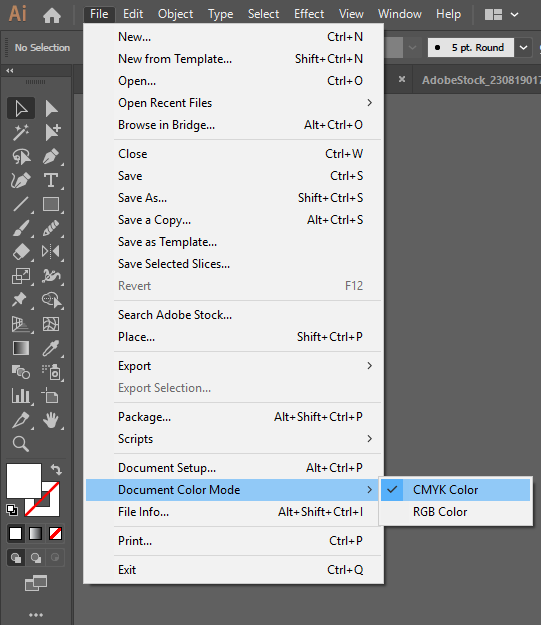 Adobe Illustrator offers the option to design in a CMYK color mode.[/caption]
Most printers employ CMYK, and not RGB. Using RGB color models to print artwork using a CMYK printer, will result in artwork that is dark and muddy-looking. Don’t worry, though, all is not lost. You can use artwork editing software like Adobe Illustrator or Photoshop, to convert an RGB image to CMYK.
That’s right. You got it. Now you can flaunt your newfound knowledge in the face of your snooty print bros. What better way to do that than with a brand new custom label from LabelValue. Not only can our printing press produce crisp clean CMYK images, but it implements CMYKOG technology, too. I know, I know but that just means we use a wider selection of colors. The O and G standing for orange and green, respectively. With these two colors included, the range of potential colors for your printed label is greatly increased.
You can get started on your free label quote here. Or by dialing 800-750-7764. LabelValue is open Monday through Friday. We’d love to help.